
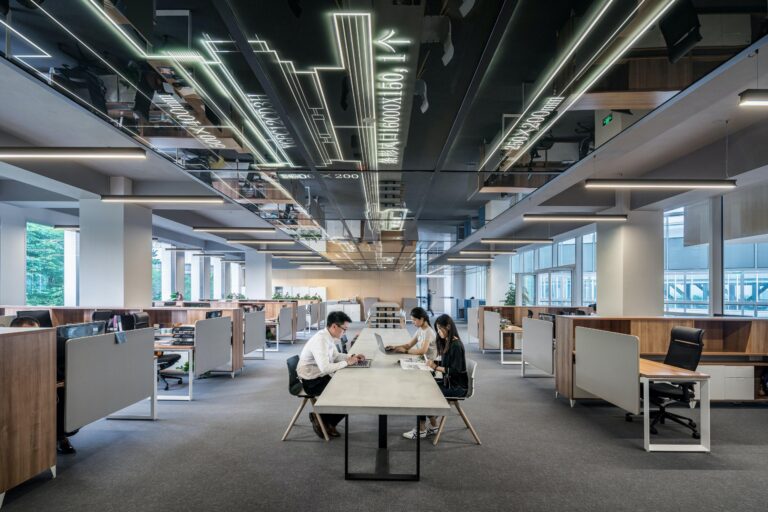
How to Choose the Right Size Standing Desk for Your Office

Get Pricing
Sit-stand desks, lockers, workstations and seating — indicative pricing for commercial fitouts in Canberra.
Pricing Catalogue
Aurora’s commercial furniture specialists break down the size decisions that affect ergonomics, stability and workflow — before you order.
Quick answer
The right sit-stand desk size depends on the user’s role, technology setup and available space — not just what fits in a room. For most commercial offices, Aurora’s default is a 1500mm wide × 800mm deep configuration. Where dual monitors are standard, 1800mm wide is strongly preferred. Depth is the most frequently overlooked dimension and has a meaningful impact on daily ergonomics.
Aurora has been specifying and supplying commercial sit-stand desks for over 20 years across government, education, healthcare and corporate environments throughout Australia. The sizing questions on this page are drawn directly from what our team is asked every week.
Jump Ahead To
“What size desk do I need?” — it’s one of the questions Aurora’s team fields most often, and it rarely has a one-line answer.
The right size isn’t just about fitting a desk into a room. It’s about matching the desk to the user, the workflow, the technology setup, and the broader office layout. Get it wrong and you end up with workstations that are either cramped for full-time use or oversized for the space available — neither of which serves the business or the people using them.
We cover the key size decisions: width, depth, configuration, and how those choices interact with ergonomics, stability and cable management.
1. Desk Width: The Decision Most Buyers Underestimate
Standard commercial standing desks are available in 1200mm, 1500mm and 1800mm widths. Each suits a different use case.
Aurora’s commercial sit-stand desk width guide. All widths available with 700mm or 800mm depth options.
The most common width mistake Aurora’s team sees isn’t choosing too wide — it’s choosing too narrow. A 1200mm desk might look adequate in a catalogue, but once you add dual monitors, a keyboard tray and some cable management, working space disappears fast.
For most commercial fitouts, 1500mm is Aurora’s default recommendation. Where space and budget allow, 1800mm delivers a noticeably better experience for full-time users.
“The most common sizing mistake isn’t necessarily choosing a desk that’s too small or too large — it’s choosing one without considering the overall space. A desk may look perfect on paper, but if it doesn’t allow for comfortable movement, storage, seating, or other furniture requirements, it can quickly become impractical. After helping Australian businesses create productive workspaces for over 20 years, we’ve found that the best results come from assessing the entire environment first and then selecting the desk size that balances functionality, comfort, and available space.”
Dean — Aurora Office Furniture
2. Desk Width for Dual Monitor Setups
Dual monitors are now standard in most commercial office environments — and desk width directly affects how comfortable that setup is in practice.
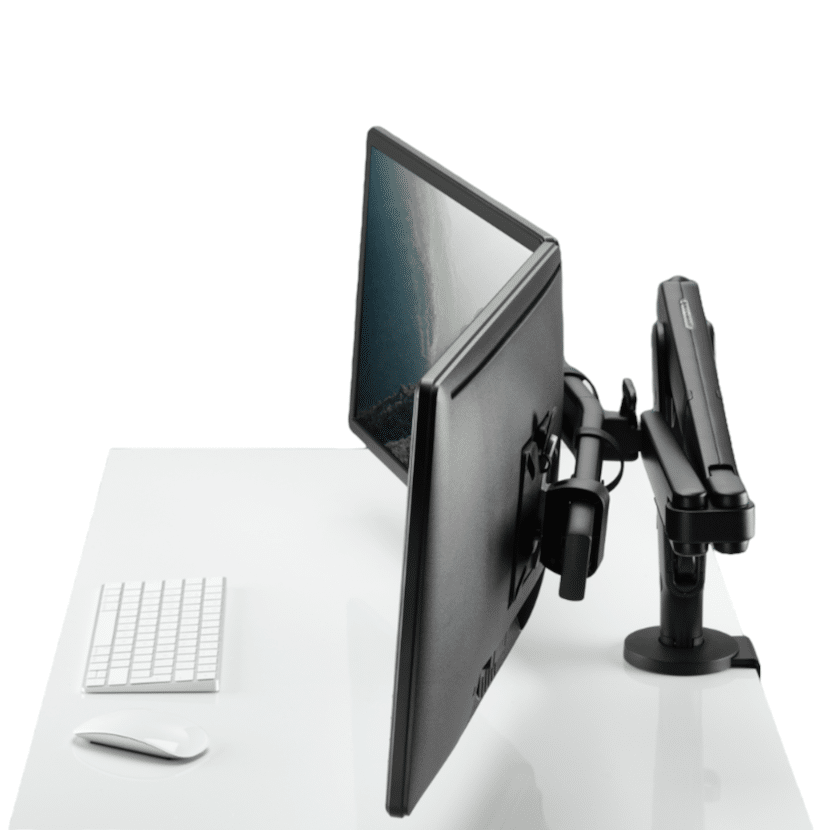
Aurora’s recommendation:
- 1500mm — workable minimum for dual monitors; monitor arms are strongly advised
- 1800mm — the preferred width; allows comfortable positioning with room for peripherals and documents
Monitor arms are particularly important on sit-stand desks. At standing height, the distance between your eyes and the screen changes. A monitor arm lets users fine-tune position at every height — something fixed monitor stands don’t allow.
If a buyer is committed to a 1500mm desk width and running dual monitors, Aurora strongly recommends pairing it with a dual monitor arm rather than relying on fixed stands. It’s a small additional cost that meaningfully improves usability.
“For most dual-monitor setups, we recommend a desk width of at least 1500mm, with 1800mm being the ideal choice where space allows. This provides enough room for comfortable monitor positioning, peripherals, and day-to-day work without feeling cramped. After more than 20 years of helping businesses create productive workspaces, we’ve found that a slightly larger desk often delivers better ergonomics, flexibility, and long-term usability.”
Dean — Aurora Office Furniture
3. Desk Depth: The Most Overlooked Dimension
Buyers spend a lot of time thinking about width and almost no time thinking about depth — which is unfortunate, because depth has a significant impact on ergonomics and day-to-day comfort.
Aurora recommends 800mm as the default commercial depth for most fitouts.
The standard commercial depth is 700mm. That’s adequate for a laptop or single monitor setup, but if your team works with paperwork, reference materials or multiple accessories, 800mm makes a meaningful difference.
Aurora recommends 800mm as the default depth for most commercial fitouts. The additional 100mm costs very little relative to the comfort improvement, and buyers rarely regret the upgrade.
“Desk depth is one of the most overlooked yet important considerations when choosing a workstation. A depth of 700mm is generally sufficient for a laptop, keyboard, and monitor setup, but if your work involves paperwork, reference materials, or additional accessories, we typically recommend 800mm depth for greater comfort and usability. After more than 20 years of workplace planning, we’ve found that choosing the right depth has a significant impact on both ergonomics and day-to-day productivity.”
Dean — Aurora Office Furniture
4. Does Width Affect Stability at Full Height?
This is a question Aurora hears frequently, particularly from buyers who have seen sit-stand desks wobble at standing height in cheaper retail products.
The short answer: width has a minor influence on stability, but frame quality is the much bigger factor.
- A well-engineered dual-motor frame will be stable across standard commercial widths (1200mm–1800mm)
- Wider desks may exhibit marginally more movement at full extension, but on a quality frame this is barely perceptible
- The instability buyers experience with cheaper sit-stand desks is almost always a frame or motor quality issue — not a width issue
If stability at height is a concern, the right answer is choosing a commercial-grade frame with a dual-motor lifting system — not restricting desk width. Single-motor frames drive the crossbar from one side, which creates uneven lift and wobble. Dual-motor frames lift from both sides simultaneously, which is significantly more stable regardless of width.
“Desk width can have some impact on stability at full height, but it’s rarely the deciding factor. In our experience, the quality of the frame and lifting system plays a much bigger role. Dual-motor sit-stand desks are typically more stable and robust than single-motor models, particularly when raised. While wider desks may exhibit slightly more movement than narrower ones, a well-engineered desk should remain stable regardless of size. The key is choosing a quality frame designed to support the desk’s dimensions and intended workload.”
Dean — Aurora Office Furniture
5. Straight Desk vs Corner/L-Shape: Which Configuration Is Right?
The choice between a straight desk and an L-shaped or corner desk comes down to space availability, the user’s role, and how the workstation will be used day to day.

For most commercial open-plan environments, straight desks are the more efficient choice:
- More workstations fit into the available floor space
- Easier to arrange in back-to-back configurations
- Simpler cable management and power solutions
- More consistent with standard commercial furniture procurement
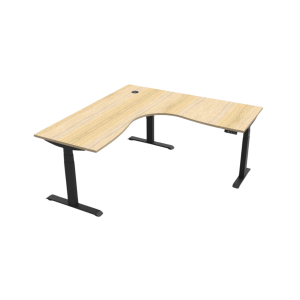
L-shaped and corner standing desks tend to suit executive offices and senior roles where there’s more space and a clear need for separate working and reference zones.
“In most workplace environments, straight desks are the more efficient use of space, allowing more workstations to fit comfortably within a room while maintaining adequate circulation and collaboration areas. L-shaped or corner desks are typically better suited to executive offices, where there is more space available and a need for separate work and meeting zones. The right choice ultimately depends on the available floor space, the user’s role, and how the workspace will be used day to day.”
Dean — Aurora Office Furniture
6. Back-to-Back Sit-Stand Workstation Configurations
Back-to-back configurations — two sit-stand desks facing each other with a shared privacy screen in the centre — are common in commercial open-plan offices. They’re space-efficient and work well ergonomically when specified correctly.
Aurora’s recommended components for a back-to-back sit-stand workstation:
- Ergonomic task chair
- Monitor arm (single or dual depending on setup)
- Mobile pedestal for personal storage
- Integrated power and cable management solution
- Acoustic privacy screen — extending above and below the desktop

The acoustic privacy screen is worth noting specifically. In back-to-back configurations, noise and visual distraction become real productivity factors. A screen that only sits above the desktop surface leaves users visible and audible to the person opposite. Aurora recommends screens that extend below the desktop line as well, which meaningfully improves focus and perceived privacy.
“For a back-to-back sit-stand workstation, our default recommendation includes an ergonomic chair, monitor arm, mobile pedestal, integrated power solution, and an acoustic privacy screen that extends both above and below the desktop. This combination supports ergonomics, cable management, privacy, and day-to-day functionality while creating a clean and productive workspace. After more than 20 years of designing workplace solutions, we’ve found that incorporating these elements from the outset delivers the best balance of comfort, performance, and long-term flexibility.”
Dean — Aurora Office Furniture
7. Think Space Before You Think Size
Selecting the right desk size is inseparable from how that desk sits within the wider room. Aurora’s team consistently finds that buyers who start with the product end up revising their selections after layout planning — often multiple times.
Before finalising any desk size, the questions to answer are:
- How many workstations need to fit in the space?
- What’s the minimum comfortable circulation path between desks (Aurora recommends at least 1200mm for primary walkways)?
- What storage, screening or collaboration furniture shares the space?
- What does the power and cable management solution look like — and does it affect desk depth or positioning?
Aurora provides 3D space planning and layout services as part of the commercial furniture consultation process. Getting a layout confirmed before ordering is far less costly than discovering size issues at installation.
Speak to Aurora About Your Office Fittest
Aurora works with commercial businesses, government departments, schools and interior designers across Australia to specify and supply the right sit-stand desk configuration for each environment — from individual workstations through to full-floor fitouts.
Contact Aurora for a consultation, 3D layout plan and accurate project quote.
Need a Quote or Layout Plan?
Aurora works with commercial businesses, government departments, schools and interior designers across Australia. We provide 3D space planning, accurate project quotes and expert specification advice — at no obligation.
Frequently Asked Questions
Frequently Asked Questions: Sit-Stand Desk Sizes
What is the standard size of a sit-stand desk in Australia?
The most common commercial sit-stand desk widths in Australia are 1200mm, 1500mm and 1800mm. Standard depths are 700mm or 800mm. For most commercial office environments, a 1500mm × 700mm or 1500mm × 800mm configuration is considered the standard starting point, with 1800mm preferred where space allows.
What size sit-stand desk do I need for dual monitors?
For a dual monitor setup, Aurora recommends a minimum width of 1500mm, with 1800mm being the preferred option. At 1500mm, monitor arms are strongly advised to maximise usable desk space. At 1800mm, users have comfortable room for both screens, a keyboard, and day-to-day materials without feeling cramped.
Does a wider sit-stand desk wobble more at standing height?
Slightly, but the difference on a quality commercial frame is minimal. Frame and motor quality matters far more than width. A commercial-grade dual-motor frame will be stable at 1800mm; a low-quality single-motor frame will wobble at 1200mm. If stability is a concern, the answer is upgrading the frame — not reducing desk width.
Should I choose a straight desk or a corner desk for a sit-stand setup?
For most commercial environments, straight desks are the more efficient choice — they maximise the number of workstations per square metre and are simpler to configure for cabling and screening. Corner or L-shaped configurations suit executive offices or senior roles where additional working zones are genuinely needed. In open-plan commercial fitouts, straight desks are almost always the correct specification.
What depth should I choose for a commercial sit-stand desk?
Aurora recommends 800mm as the default commercial depth. 700mm is workable for a laptop or single monitor setup, but 800mm provides meaningfully more usable space for dual monitors, peripherals, paperwork and reference materials. The additional depth is a minor cost relative to the ergonomic improvement for full-time users.
What is a back-to-back sit-stand workstation?
A back-to-back configuration places two sit-stand desks facing each other, separated by a shared privacy screen. It’s a common arrangement in commercial open-plan offices, making efficient use of floor space while maintaining individual workstation identity. Aurora recommends screens that extend both above and below the desktop line for meaningful acoustic and visual privacy in this configuration.
How much space do I need around a sit-stand desk?
Aurora recommends a minimum of 1200mm clearance on primary walkways between workstations or desk clusters. For individual workstation reach zones behind the desk, allow at least 900mm. These are minimums — 1400–1500mm on primary circulation paths is more comfortable in busy environments and is consistent with Australian workplace design guidelines.
Recommended products

Featured posts
View all posts



Get Our Pricing Catalogue
